

About Paella Player 8
Paella Player originated as an alternative video player for Opencast. At that time, the official video player for Opencast was implemented using Adobe Flash technology. As a result, the Flash-based video player used by Opencast was unable to function on mobile, which led to a significant limitation for users who wanted to access video content on their mobile devices.
Paella Player was developed to provide an alternative multi stream video player that could work on a wide range of devices. It was designed to be compatible with HTML5 technology, which allowed it to work seamlessly on modern web browsers without the need for Flash.
Initially, until Paella Player 6, the architecture of the player was monolithic. However, with the release of
version 7, the project underwent its most significant transformation to date. Paella Player 7 shifted from being a monolithic player
to a modular architecture, comprising multiple libraries. The core library, paella-core, implemented the fundamental capabilities of
the multi-stream player, including the API for displaying multiple video streams simultaneously and plugin support.
To complement the core library, several additional libraries were developed to provide extra features to the player, such as
paella-basic-plugins, paella-slide-plugins, and paella-zoom-plugin. Paella Player 7 was thus built on top of version 1.x of these
libraries, marking a significant milestone in the project’s evolution.
With the release of Paella Player 8, we have transitioned to version 2.x of the libraries, which are now grouped under the @asicupv/-
scope: @asicupv/paella-core, @asicupv/paella-basic-plugins, and so on. This document will guide you through the new features and
improvements introduced in Paella Player 8 compared to its predecessor, version 7.
Paella Player vs paella-core
Section titled “Paella Player vs paella-core”Paella Player and paella-core are closely related but serve different purposes within the ecosystem:
-
Paella Player: This is the complete video player application designed for end users. It includes all the necessary components, such as the user interface, plugins, and configurations, to provide a fully functional multi-stream video player. Paella Player is built on top of
paella-coreand leverages its capabilities to deliver a seamless video playback experience. -
paella-core: This is the foundational library that provides the core functionality of the multi-stream video player. It includes the API for managing video streams, plugin support, and other essential features.
paella-coreis intended for developers who want to build custom video players or extend the functionality of Paella Player by creating new plugins or integrating additional features.
In summary, paella-core is the engine that powers Paella Player, while Paella Player is the complete solution ready to be used by end users or integrated into larger platforms.
The Paella ecosystem
Section titled “The Paella ecosystem”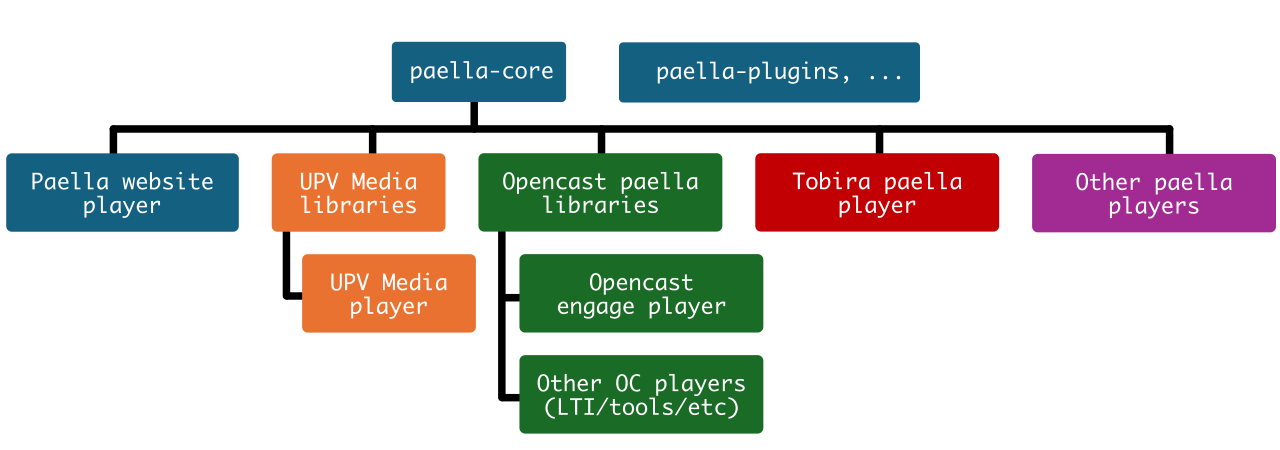
The Paella ecosystem centers around the “paella-core” and its “paella-plugins”. Branching out from this core are several Paella players, each with its own features and functionalities. These players include:
- Paella website player: The player used in this website, which is built on top of the
paella-corelibrary. This player serves as a demonstration of the capabilities of Paella Player. - UPV-media libs: A set of plugins and utilities for Paella developed by the Universitat Politècnica de València (UPV). These plugins are specifically designed to enhance the functionality of Paella and are available on the UPV’s video portal.
- UPV-media player: The video player used in the UPV’s video portal. This player is built on top of Paella and leverages the “UPV-media libs” to provide additional features and integrations tailored to the portal’s needs.
- Opencast engage player: The player used in the Opencast video management system, integrated with Paella functionality.
- Tobira paella player: The player based on Paella developed as part of the Tobira project, offering features and integrations specific to that platform.
- Other paella players…: Refers to other players based on Paella developed by different projects, each with their own specific use cases and integrations.
In summary, the Paella ecosystem is modular, with a core providing the main functionality and different players built on top of it, some with specific integrations or features.
What’s new in Paella Player 8
Section titled “What’s new in Paella Player 8”The new version of Paella introduces significant changes, including:
-
Repository unification: All previous repositories have been unified into a single repository to simplify development, bug tracking, and feature integration. This change ensures a more cohesive development process and makes it easier for contributors to collaborate and maintain the project.
-
Paella Player libraries: Paella Player 8 introduces significant updates to its libraries, including the adoption of scoped packages under
@asicupvon npm, and the addition of a new library for video plugins. These changes enhance flexibility, improve performance, and simplify the integration of new features into the player. -
New building system: The adoption of Vite as the new building system marks a significant improvement in the development workflow. Vite offers faster build times and a more efficient development process compared to the previous Webpack-based system. This change not only enhances performance but also simplifies the integration of plugins and styles, making it easier for developers to customize and extend the player.
-
Enhanced User Experience: The user interface has been completely revamped to provide a more modern and intuitive experience. Navigation has been streamlined, making it easier for users to interact with the player and access its features. Additionally, new UI components have been introduced to enhance usability and ensure a consistent experience across different devices and screen sizes.
-
Accessibility Improvements: Accessibility has been a top priority in this release. The player now includes improved keyboard navigation, allowing users to seamlessly move between elements such as the playbar and menus. The introduction of multi-level menus ensures that all users, including those relying on assistive technologies, can easily access and interact with the player’s features. These changes align with modern accessibility standards to provide an inclusive experience.
-
Skinning: Paella Player 8 introduces a new approach to customization and skinning by leveraging CSS variables. These variables allow developers and designers to easily personalize the player’s appearance, including colors, positions, sizes, and paddings, across all components. This simplifies the process of creating unique designs and ensures flexibility and maintainability.
-
Deprecated: Several features and plugins have been deprecated in Paella Player 8 to streamline the platform and improve usability:
- The Pop-up API has been removed in favor of the new multi-level menu system, which enhances accessibility and usability.
- The
paella-layout-pluginsrepository has been deprecated, with basic layouts now integrated directly intopaella-core. - Keyboard shortcut plugins have been removed, as keyboard navigation is now managed directly through menus.
- The Progress Indicator Plugins system has been replaced with a more flexible API for customizing the progress bar.
- The current time label on the playback bar has been removed to reduce visual clutter and improve accessibility.
Repository unification
Section titled “Repository unification”The unification of all previous repositories into a single repository brings several benefits:
- Simplified development: Developers no longer need to navigate multiple repositories, making it easier to locate and modify code.
- Streamlined issue tracking: All issues are now centralized in one place, reducing confusion and improving the efficiency of bug reporting and resolution.
- Improved collaboration: Contributors can work more effectively with a unified structure, ensuring better coordination and faster integration of new features.
- Consistent structure: Each plugin package is organized in a separate folder within the repository, maintaining clarity and modularity while simplifying dependency management.
The new unified repository can be found at: https://github.com/polimediaupv/paella-player
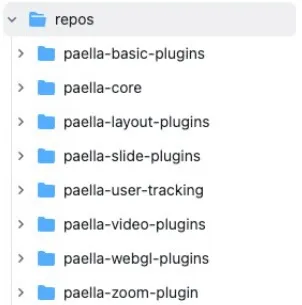
Although all repositories are now unified, it’s worth noting that core library and plugin packages remain independent on npm. This means each package can be installed and updated individually, providing flexibility and easing dependency management.
Paella Player libraries
Section titled “Paella Player libraries”The introduction of paella-core 2.x brings significant enhancements that necessitate updates to codebases previously utilizing version 1.x. The majority of these changes are driven by the transition to a new building system, as well as substantial improvements in user experience and accessibility.
Key Changes and Migration Considerations
- Scoped packages: The
paella-corelibrary and all the plugins packaged are now published under the@asicupvscope. - Building System Overhaul: The most notable change is the adoption of a Vite, which streamlines the development process and enhances overall build performance.
- Enhanced User Experience:
paella-core2.x introduces a range of features designed to improve the user experience, including revamped UI components, enhanced navigation, and more intuitive interaction models. - Accessibility Improvements: The latest version prioritizes accessibility.
Scoped packages
Section titled “Scoped packages”The npm packages related to Paella are now publicly available under the @asicupv scope. This means that the package names must be updated to include this scope.
The following packages must be updated to include the @asicupv scope in their name:
paella-core ->@asicupv/paella-corepaella-basic-plugins->@asicupv/paella-basic-pluginspaella-slide-plugins->@asicupv/paella-slide-pluginspaella-user-tracking->@asicupv/paella-user-trackingpaella-zoom-plugin->@asicupv/paella-zoom-pluginpaella-webgl-plugins->@asicupv/paella-webgl-plugins
Video formats
Section titled “Video formats”A new library called @asicupv/paella-video-plugins is introduced, which will contain advanced video formats. This library will be publicly available under the @asicupv scope:
HLSVideoFormat: support for HLS m3u8 video streams.HLSLiveVideoFormat: support for HLS m3u8 live streams and low latency HLS.MP4MultiQualityFormat: support for MP4 video playback with dynamic quality change. For dynamic quality change it is still more advisable to use HLS streams, but this can be a compromise solution for organizations that do not have the capacity to re-encode or transcode their video libraries.
In addition to supporting various video formats, a dedicated plugin is provided to enable the display of embedded captions within HLS (HTTP Live Streaming) videos. However, it’s essential to note that HLS embedded captions, particularly those generated in real-time, may not be fully compatible with the native captioning system integrated into paella-core.
To address this limitation, our plugin offers a compromise solution. Although it doesn’t allow for seamless integration of subtitles with the paella-core system, it does enable the display of embedded captions within HLS videos. This means that users can still benefit from having captions available, even if they are not fully integrated with the paella-core platform.
Improved code size: The HLS plugins imports the hls.js library dynamically. This avoids the need to load this library if the video format is not HLS.
New building system
Section titled “New building system”The building system for paella and all its plugin libraries has been changed from Webpack to Vite. This has two implications:
- Importing plugins must be done with the explicit system.
- CSS files must be imported manually
Explicit Plugin Import
Section titled “Explicit Plugin Import”The introduction of paella-core 2.x brings a significant change to the building system, specifically affecting the way plugins are imported. As of version 2.x, plugins must be imported using explicit import, which replaces the previous implicit import method. The plugin import system of paella-core 1.0 allows to import all plugins of a plugin module using a plugin context object. This import system is based on a feature of Webpack, therefore this method of importing plugins has been removed.
Example of Explicit Plugin Import:
// NOT SUPPORTED: plugin context importimport getBasicPluginsContext from 'paella-basic-plugins';
let paella = new Paella('player-container', {    customPluginContext: [        getBasicPluginsContext()    ]});
// Explicit import:import { FullscreenButtonPlugin } from '@asicupv/paella-basic-plugins'
const player = new Paella('player-container', { plugins: [ FullscreenButtonPlugin ]})Note that plugin packages may contain an array definition with all the plugins you export. In this case you can easily include all plugins in your player:
import { basicPlugins } from '@asicupv/paella-basic-plugins'
const player = new Paella('player-container', {    plugins: [        ...basicPlugins    ]})
With the explicit plugin import system it is possible to define a default configuration, which will be used in case no configuration for that plugin is found in the player configuration file.
import { FullscreenButtonPlugin } from '@asicupv/paella-basic-plugins'
const player = new Paella('player-container', {    plugins: [        {            plugin: FullscreenButtonPlugin,            config: {                enabled: true            }        }    ]})
Manual Inclusion of Stylesheets
Section titled “Manual Inclusion of Stylesheets”Stylesheets were automatically included by Webpack inside the JavaScript code in paella-core 1.x. This posed some security and performance problems. In version 2.x, with the use of Vite instead of Webpack, style sheets are separated from the JavaScript code. For that reason they have to be explicitly included in the code.
This happens both with paella-core styles and with the styles of those libraries that include style sheets. This is an example of how you should include the style sheets in case you use Vite:
import '@asicupv/paella-basic-plugins/paella-basic-plugins.css';import '@asicupv/paella-core/paella-core.css';import '@asicupv/paella-slide-plugins/paella-slide-plugins.css';
...
The method of importing style sheets may vary depending on the building system you use in your player. You can also choose to include the style sheets directly in the html file.
In any case, this new way of working simplifies the inclusion of custom style sheets, since with the system used in version 1.x it was not easy to predict in which order the CSS files would be included. For this reason, in version 1.x there was a specific API to import custom styles:
import { utils } from 'paella-core';
...
// This will no longer be necessary in version 2.x.await utils.loadStyle('custom-paella-styles.css');
With version 2.x it is no longer necessary to use this API, now it is enough to include the style sheets in the order that suits us best.
import '@asicupv/paella-basic-plugins/paella-basic-plugins.css';import '@asicupv/paella-core/paella-core.css';import '@asicupv/paella-slide-plugins/paella-slide-plugins.css';
import "./my-custom-paella-style.css"...
Enhanced User Experience and Accessibility Improvements
Section titled “Enhanced User Experience and Accessibility Improvements”Paella Player 8 introduces significant updates to improve both user experience and accessibility
- Keyboard Navigation: Navigation between the playbar and timeline elements has been enhanced, making it easier for users to interact with the player using a keyboard.
- Multi-Level Menus: The traditional popup-based menu system has been replaced with a new multi-level menu system, which is statically positioned on the playback bar. This change improves usability, reduces screen space usage, and aligns with modern accessibility standards.
Accessibility
Section titled “Accessibility”Most of the changes have been made to rebuild elements of the player to make it easier to implement keyboard navigation and accessibility. Keyboard navigation between the playbar and timeline elements has been improved, and menu pop-ups have been replaced with a new multi-level menu system.
New playback and progress bar
Section titled “New playback and progress bar”The progress bar has been redesigned using a standard input element of type range, which improves accessibility by leveraging native browser components. Additionally, an enhanced slide marker system provides clearer visual cues for navigating video content.
In addition, the new progress bar now features an improved slide marker system, which provides a clearer indication of the video range associated with each slide. This enhancement allows users to more easily navigate through the video content and identify the specific sections corresponding to each slide.

New menus
Section titled “New menus”paella-core 2.x has replaced the traditional popup-based menu system with a new multi-level menu system that is statically positioned on the playback bar.
The new multi-level menu system offers several benefits:
- Native CSS Positioning: Eliminates the need for JavaScript-based positioning.
- Improved Accessibility: Automatic keyboard navigation management ensures a seamless experience for users relying on assistive technologies.
- Enhanced Usability: Multi-level menus reduce visual clutter and improve interaction.
Plugins developed with the MenuButtonPlugin API automatically benefit from these improvements. However, plugins using the PopUpButtonPlugin API will continue to function but won’t leverage the new navigation features. Developers are encouraged to migrate to the MenuButtonPlugin API for optimal results.
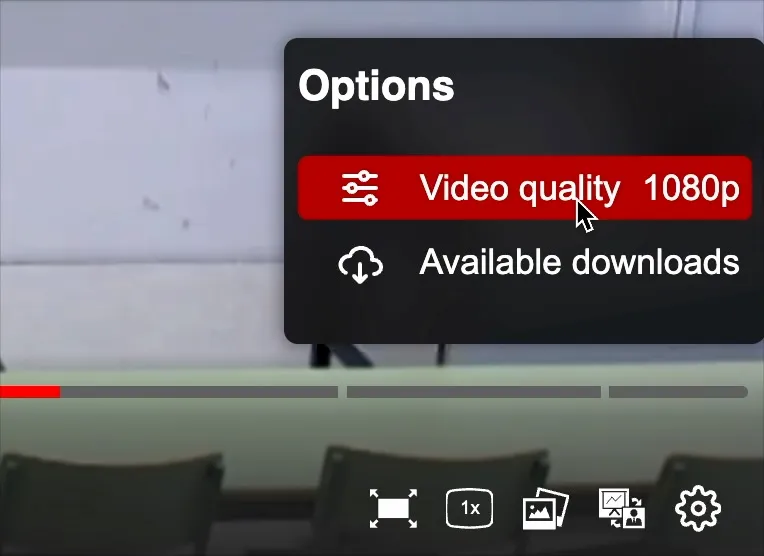
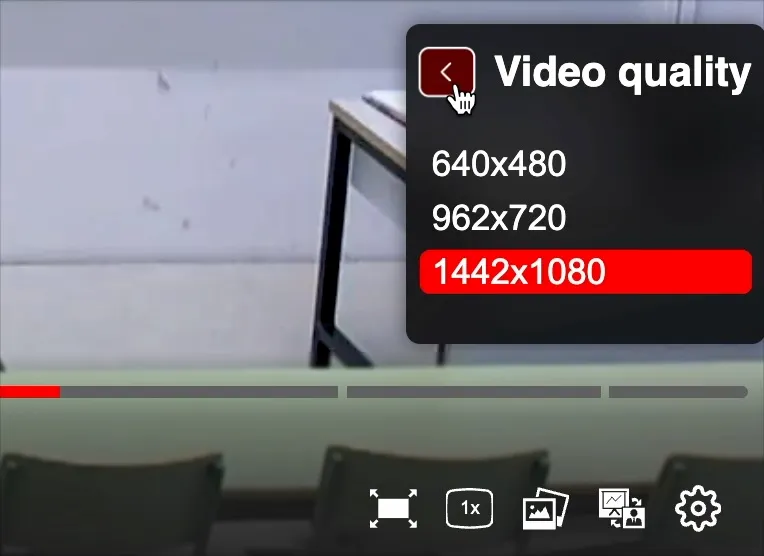
This change brings several benefits, including:
- Native CSS positioning: The new menu system uses native CSS positioning, eliminating the need for JavaScript-based positioning.
- Improved accessibility:
paella-core2.x has more control over the content displayed in menus, allowing for automatic keyboard navigation management. This significantly improves accessibility without requiring plugin developers to worry about these issues. - Enhanced usability: The new menu system replaces pop-ups with multi-level menus, improving usability and reducing screen space usage.
All plugins implemented using the MenuButtonPlugin API in paella-core 1.x will automatically benefit from these changes. However, plugins developed using the PopUpButtonPlugin API will continue to function but will not take advantage of automatic navigation management.
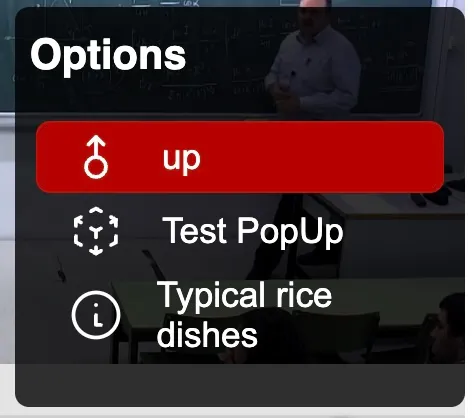
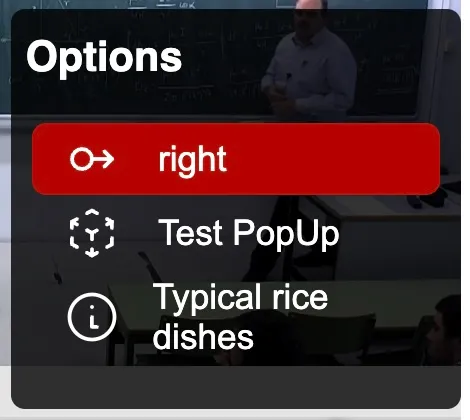
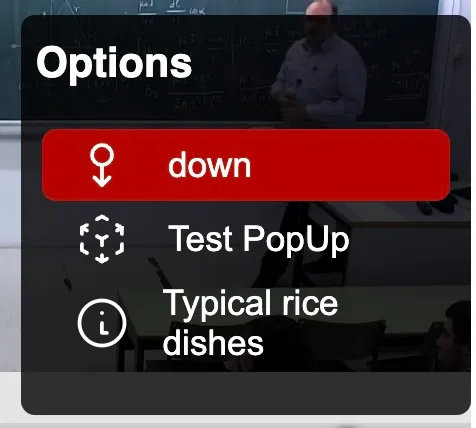
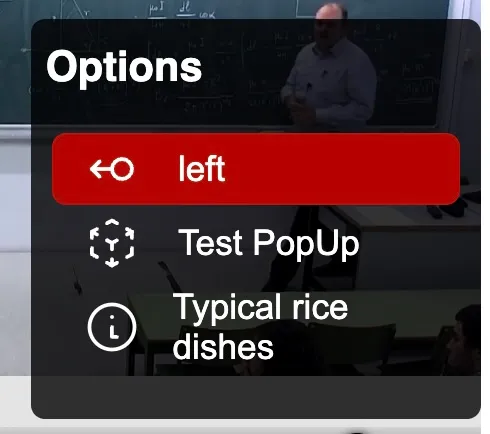
In addition to this, the new menu API incorporates a new element: statuses. With this new API it is possible to maintain a status on menu items, and to modify the menu icon and the status icon.
Recommendation: Migrate Pop-up Plugins to Menu Plugins
Whenever possible, it is recommended to migrate pop-up plugins to menu plugins to leverage the benefits of the new menu system. This migration will ensure that your plugins are optimized for accessibility and usability, providing a better experience for users.
Custom progress bar
Section titled “Custom progress bar”paella-core 2.x now includes a new API that allows developers to create a custom playback bar from scratch. This enables the implementation of new features that are not available in the default playback bar.
To create a new playback bar, you need to implement the getProgressIndicator function in the player’s initialization object. This function returns an instance of the progress indicator component.
If you want to extend the functionality of the default playback bar instead of creating a completely new one, you can call the createProgressIndicator function within your getProgressIndicator implementation. This function creates the default progress indicator, which you can then modify as needed.
import { createProgressIndicator } from "@asicupv/paella-core"
const playerConfig = {  // ...  getProgressIndicator: () => {    const defaultProgressIndicator = createProgressIndicator();
    // Modify the default progress indicator to add custom features
    return defaultProgressIndicator;  }};
Customization and Skinning
Section titled “Customization and Skinning”Paella Player 8 has undergone significant changes, introducing new selectors and CSS variables to simplify the customization of the entire player. These updates allow developers and designers to personalize colors, positions, sizes, paddings, and more across all components of the player.
Our objective is to enable full customization of the player solely through the modification of CSS variables. This approach allows for the creation of unique appearances without the need to worry about specific selectors or styles for individual components.
Using CSS variables for customization offers flexibility, reusability, and ease of maintenance. In the future, additional variables may be introduced to further enhance customization capabilities. For more information on available variables, please refer to our separate documentation.
Related: Styling CSS Variables
Things that have been removed
Section titled “Things that have been removed”Pop-up API
Section titled “Pop-up API”The Pop-up API has been deprecated and removed. This API was initially introduced for historical reasons, as it was used to implement menus in paella-core 1.x. However, with the introduction of the new multi-level menu system, the need for a separate API to create pop-ups has been eliminated.
Furthermore, the standard HTML dialog element provides a straightforward way to migrate code that previously used Paella’s pop-up API. This means that developers can easily transition their existing code to use the native HTML dialog functionality, which offers a more modern and standardized approach to creating interactive dialogs.
Benefits of Removal:
- Simplification of the API: By removing the Pop-up API, the overall API surface area is reduced, making it easier for developers to learn and use.
- Improved Standardization: The use of standard HTML elements, such as dialog, promotes consistency and interoperability across different browsers and platforms.
This change only affects you if you have directly used the APIs to open pop ups. If you had PopUpButtonPlugin plugins, they automatically adapt to the new multi-level menu API. However, whenever possible it is recommended to use MenuButtonPlugin first, as this will automatically handle keyboard navigation events.
Paella Layout Plugins
Section titled “Paella Layout Plugins”The paella-layout-plugins repository has been deprecated and removed in version 2.x. This decision was made because all layouts in this library were static, and static position layouts are no longer supported in the new version. Instead, the basic layouts have been integrated directly into paella-core.
While there are currently no plans to release a new layout library for version 2.x, this possibility is not entirely ruled out for the future. For now, developers can rely on the built-in layouts provided by paella-core to meet their needs.
Keyboard shortcuts
Section titled “Keyboard shortcuts”The keyboard shortcut plugins have been removed from paella-core 2.x. The platform now solely manages keyboard navigation through menus.
Reasoning Behind Removal
The decision to remove keyboard shortcut management from paella-core stems from the fact that keyboard control is highly dependent on the specific website implementation. In previous versions of paella-core (1.x), we encountered issues with websites featuring multiple players on the same page. This complexity made it challenging to manage keyboard shortcuts effectively through plugins.
In contrast, managing keyboard shortcuts directly through the player’s APIs provides a more straightforward and efficient approach. By doing so, developers can tailor keyboard control to their specific use case, ensuring a seamless user experience. This change allows for greater flexibility and customization, as developers can now handle keyboard events in a way that best suits their application.
Progress indicator plugins
Section titled “Progress indicator plugins”In paella-core 1.x, a plugin system allowed developers to draw custom content on top of the progress bar using a canvas element (Progress Indicator Plugins). However, this feature was only used for displaying the slide time markers, and its complexity made it difficult to adapt to different visual styles using CSS. The API was limited to drawing content using the canvas context, which restricted its flexibility. Progress Indicator Plugins Limitations:
- Complexity: The plugin system was overly complex, making it challenging to implement and maintain.
- Limited styling options: The use of a canvas element made it difficult to apply CSS styles, limiting the ability to customize the appearance of the progress bar.
- Limited functionality: Despite its complexity, the plugin system was only used for displaying time markers, which is now handled more efficiently by the new slide marker system.
For developers who require advanced customization options, the new progress bar API allows for complete personalization of the component. This API provides a more flexible and efficient way to implement custom functionality, making it easier to adapt the progress bar to specific use cases.
Current time label over the playback bar
Section titled “Current time label over the playback bar”The new playback bar in paella-core 2.x no longer displays the current time indicator on the progress bar. This feature was becoming increasingly less used due to accessibility issues and visual clutter, particularly in videos with multiple slides:
- Visual overload: The presence of multiple time markers on the progress bar could lead to visual confusion, making it difficult for users to focus on the current time.
- Insufficient contrast: In some cases, the time marker may not have provided sufficient contrast with the surrounding elements, further exacerbating accessibility issues.
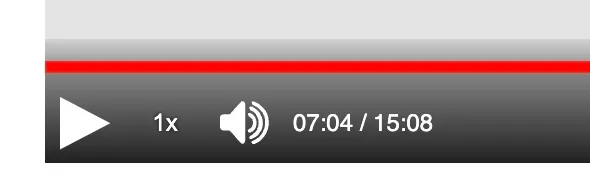
In paella-core 2.x, the current time is now displayed through a plugin that can be activated in the button area of the playback bar. This plugin offers the same alignment options as other buttons, allowing for flexible placement and customization. This new approach has several advantages:
- Improved accessibility: By removing the time indicator from the progress bar,
paella-core2.x reduces visual clutter and improves overall accessibility. - Enhanced flexibility: The new plugin-based approach allows users to customize the display of the current time, choosing from various alignment options to suit their needs.
- Simplified design: The removal of the time indicator from the progress bar results in a cleaner, more streamlined design that focuses on essential playback controls. Plugin-Based Solution